




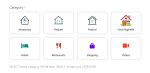


GD Radio Icons for GeoDirectory – Image & MP4 Category Tiles, Video Hover, Loop Control
19,00 €
- Visual category tiles from radios/checkboxes
- Image or short MP4 per term (Autoplay or Hover)
- Do-not-loop option; keyboard accessible
- Live previews & one-click AJAX save in admin
- Responsive grids, theme-agnostic, lightweight
Description
Description
Overview
GD Radio Icons upgrades the native GeoDirectory category field into clean, visual tiles. Use images or short MP4 clips to convey meaning at a glance, reduce choice friction, and boost selection speed.
Features at a glance
- Image & MP4 tiles: Autoplay or Hover Effect
- Do-not-loop for subtle, non-distracting motion
- Admin UX: live thumbnail previews; one-click AJAX Save
- Per-category controls: Default Listing Image/MP4, Map Icon (image), Category Color, Schema Type
- Frontend: responsive grids, keyboard accessible, ARIA roles
- Legacy-safe: existing FA/SVG values still honored at render
Why it helps
Big, tappable visuals beat long text lists—especially on mobile. Motion (kept short) tells the story faster and improves clarity.
Compatibility
- WordPress + GeoDirectory (modern versions)
- Works with standard GD forms and most themes/builders
Best practices
- Keep clips short (1–3s), muted
- Use high-contrast category colors
- Provide meaningful alt text for images
Docs & Changelog
See the documentation and changelog for setup and updates.
FAQ
Can I use MP4s? Yes—Autoplay or Hover, with Do-not-loop.
Is it accessible? Yes—keyboard controls and focus states.
Will it slow my site? It’s lightweight; use short clips for best performance.