

GD Radio Icons
Make GeoDirectory Categories Visual, Clickable, and Unforgettable
Upgrade your listing forms with image or MP4-based category tiles. Faster choices, higher conversions, and a delightfully modern UX.
# WHAT’S NEW
✓ Native Public Shortcode (Image Tiles) — Use “[gdri_categories]” to render image category tiles on any page.
✓ Generator UI — In GD Radio Icons → General, select “Layout Shortcode” and “Shortcode card size”; copy the “Shortcode (copy-only)” string and paste it where you need.
# Value proposition
✓ Help users choose faster: big, tappable tiles beat long text lists.
✓ Tell a visual story: images or motion (MP4) show each category at a glance.
✓ Built for editors: pick an image/video, set a color & schema, click Save.
✓ Works with your theme: no theme lock-in, no page builder required.
✓ Performance first: lazy data, tiny assets, and graceful fallbacks.
✓ Honors system “reduced motion” preferences for accessibility.

# How it Works
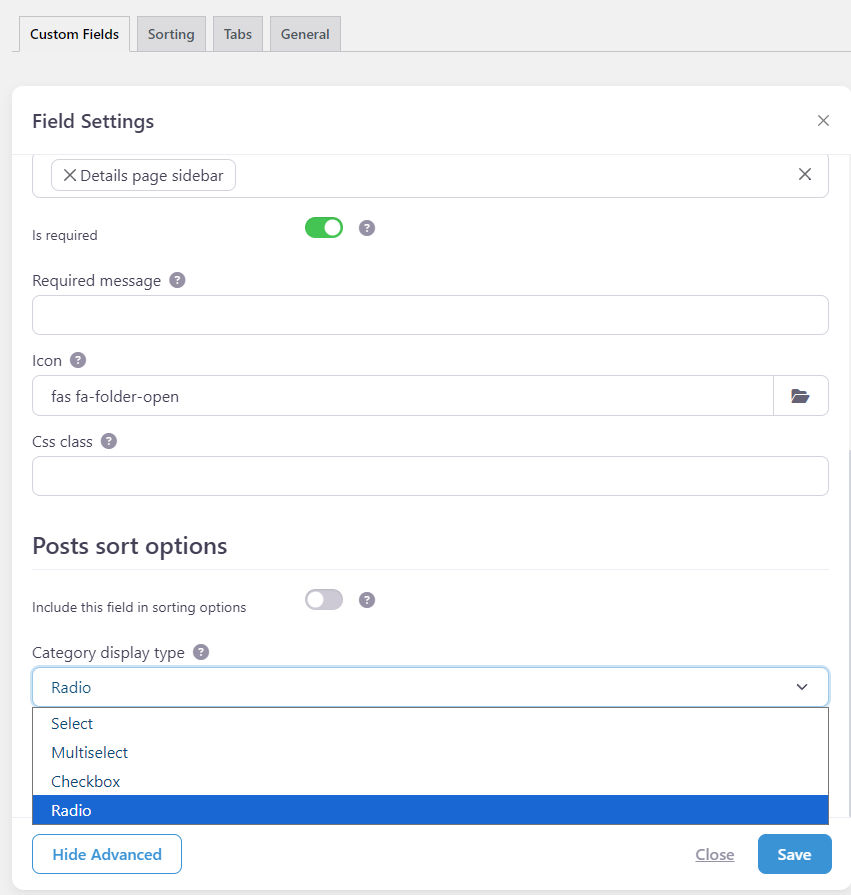
✓ Open the Category field in your form > in Advanced, select “Category Display Type.”
> With “Checkbox,” you have multiple selections.
> With “Radio,” you have a single selection.
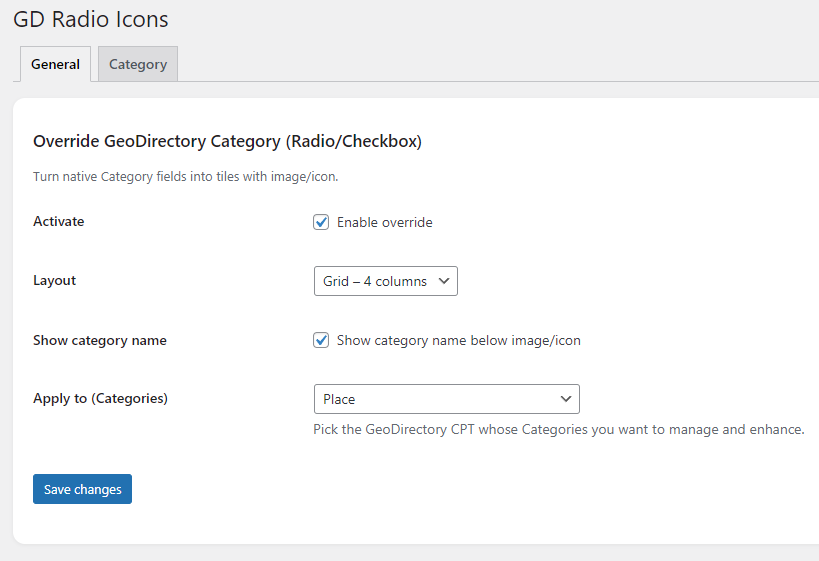
✓ In Geodirectory Menu → GD Radio Icons: choose layout (inline / grid), label visibility, and which CPT’s categories to enhance.
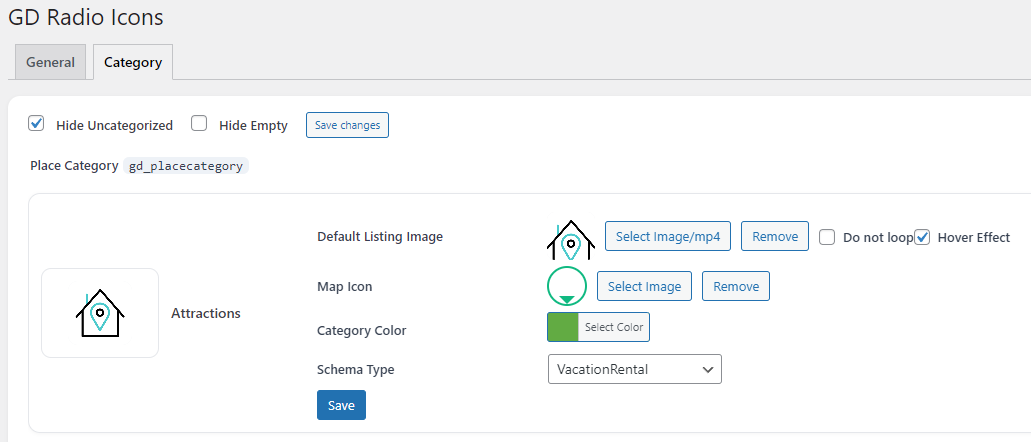
✓ Open the Category tab, pick your CPT, then for each category:
– Click **Select Image/mp4** and choose an image OR MP4.
– (If MP4) Toggle **Hover Effect** and/or **Do not loop** as needed.
– Optionally set Map Icon (image only), Category Color, Schema Type.
– Click **Save** on that row — preview updates instantly.
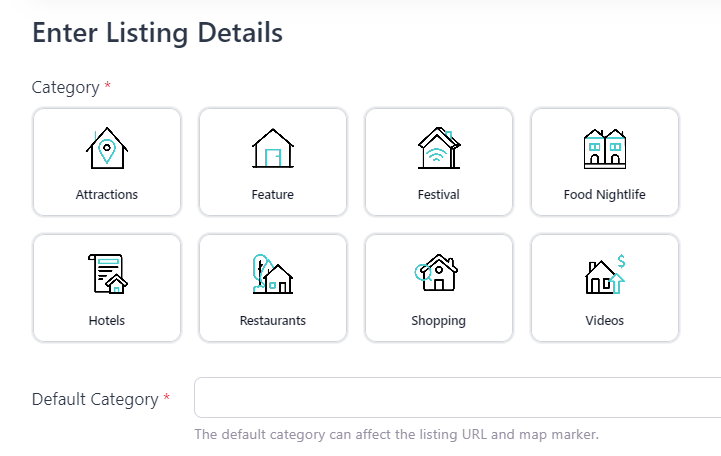
✓ On the listing form, the native category field becomes a tile grid with visuals and video behavior applied.
# Use cases we Love
✓ Tourism & Attractions — show short looping clips per category.
✓ Food & Drink — animated teasers for cafes, bars, restaurants..
✓ Real Estate & Rentals — crisp icons or small MP4s for house types, amenities.
✓ Events & Venues — quick visual scannability improves selection speed.
✓ Performance first: lazy data, tiny assets, and graceful fallbacks.
✓ Honors system “reduced motion” preferences for accessibility.
# Feature List
• Image & MP4 Tiles
– Use a thumbnail OR an MP4 clip as the “category icon”.
– MP4 **Autoplay** by default, or **Hover Effect** (play on hover/focus).
– **Do not loop** option keeps motion subtle when needed.
• Admin That Feels Native
– Per-category controls: Default Listing Image/MP4, Map Icon (image), Category Color, Schema Type.
– Live preview thumbnails (images or video).
– One-click, AJAX save per row (no page reloads).
• Frontend UX Upgrade
– Converts category radios/checkboxes into modern tiles.
– Keyboard accessible (Enter/Space), focus states, and ARIA roles.
– Responsive layouts: inline or 2/3/4-column grids.
– Title (“Category *”) correctly shown above the tiles.
• Smart Behavior
– Hover mode = no autoplay; starts on hover/focus (mobile touch supported).
– “Do not loop” obeyed in admin previews and frontend tiles.
– Hide “Uncategorized” and/or empty terms from the chooser (optional).
– Legacy safe: existing Font Awesome or SVG values are still respected at render time.
• Performance & Stability
– Lightweight assets, cache-busted AJAX for instant visual refresh.
– Minimal markup; no heavy frameworks.
– Security checks, nonces, and capabilities on all endpoints.
• Compatibility
– Designed for GeoDirectory CPT categories (auto-detected).
– Works with most themes and builders (tiles render in place).
– WordPress Media Library integration (no new asset workflow to learn).
# FAQ
Q: Can I use both images and MP4s?
A: Yes. For each category pick either an image or an MP4. MP4s can autoplay or play on hover, and can be set to not loop.
Q: Will it break my theme?
A: No. The plugin enhances the existing GeoDirectory category field in place and falls back gracefully if visuals aren’t available.
Q: Is this accessible?
A: Yes. Tiles support keyboard interaction and proper ARIA. Hover videos also start on focus.
Q: What about performance?
A: The plugin fetches only what’s needed via AJAX and uses small admin previews. On the frontend, short MP4 loops work best.
Q: Can I keep using my old icon classes or SVG URLs?
A: They’re no longer editable in Admin, but the frontend still respects existing values if present.

19,00 €Add to cart